






Loved by 100+ accountants and bookkeepers.

Task Details View for Accountants

The Task Details View gives accountants complete operational visibility into a task without distraction. It is designed to provide clarity, control, and quick decision-making inside a clean, structured interface.

This view ensures that every accounting task, whether compliance, reporting, payroll, or advisory, is fully manageable from one organised screen.

Centralised Task Overview

At the top of the Task Details View, users immediately see:

  • Task title
  • Assigned team members
  • Active timer status
  • Quick action controls
  • AI Summary access

This allows managers and staff to instantly understand who owns the task, how long it has been spent, and what actions are available.

Subtasks Panel

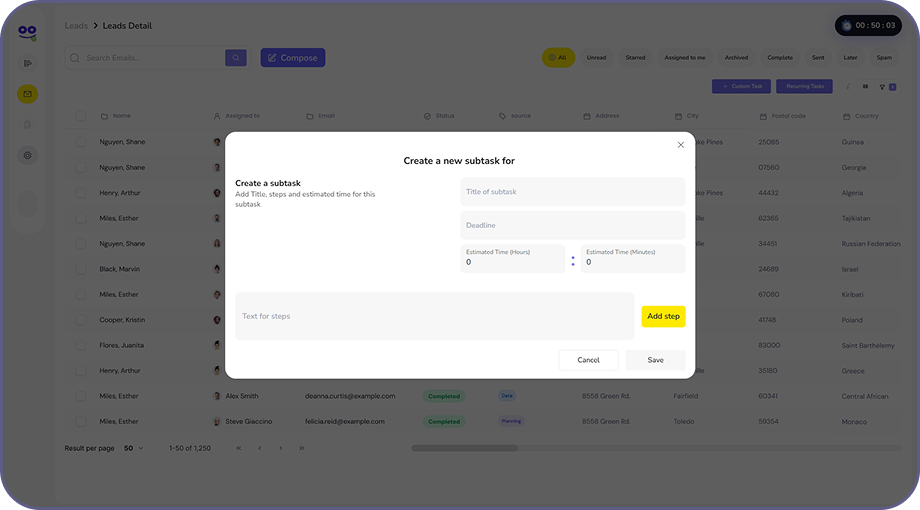
The Subtasks section allows teams to break down accounting work into actionable components.

Users can:

  • Add new subtasks
  • Mark subtasks complete
  • Structure multi-step accounting workflows
  • Manage complex client deliverables

For example, a VAT filing task can include preparation, review, approval, and submission, with everything clearly tracked within a single structured view.

Checklist Integration

The integrated checklist ensures procedural consistency. Accountants can:

  • Follow standardised compliance steps
  • Track completion stage-by-stage
  • Maintain internal control standards
  • Reduce the risk of missed filings or documentation

This is especially useful for recurring regulatory work and audit processes.

Comments & Communication

All communication stays directly within the task. Users can:

  • Add comments
  • Tag colleagues
  • Provide internal updates
  • Maintain a documented audit trail

No scattered emails. No lost context. Everything remains tied to the task.

Timeline & Activity Log

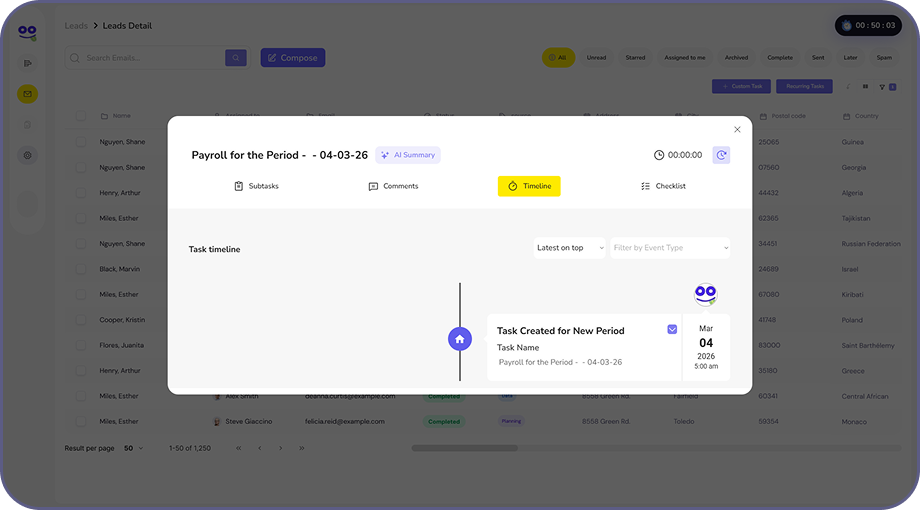
The Timeline tab records every task movement:

  • Status changes
  • Reassignments
  • Deadline updates
  • Edits and modifications
  • Time activity

This creates a complete historical log and is essential for accountability in accounting firms.

Built-In Time Tracking

Time recording is visible directly within the Task Details View. Users can:

  • Start or stop the timer
  • Monitor active tracking
  • Review total time spent
  • Support billing and productivity measurement

This ensures accurate client billing and internal performance monitoring.

Quick Action Controls

From within the Task Details View, users can:

  • Edit task information
  • Reassign team members
  • Archive completed work
  • Delete tasks when necessary
  • Update changes instantly

No need to navigate away. Everything is action-ready.

Designed for Accounting Clarity

The Task Details View supports the core operational needs of accounting firms:

  • Structured execution
  • Responsibility visibility
  • Compliance tracking
  • Time accountability
  • Clear communication
  • Full audit trail

It transforms a simple task into a controlled, accountable workflow environment.

Task Details View for Workflow Visibility and Control

Task Details View in Remindoo gives accounting teams a complete, structured overview of every task in one place. From deadlines and assignees to notes, attachments, subtasks, and progress updates, everything is centralised to improve clarity and reduce missed information. It helps firms maintain full visibility over work execution, ensuring every task is properly tracked, updated, and completed on time without confusion or duplication.

Trusted by 100+ accountants and bookkeepers.

Firms That Love Remindoo

Edit Template

Task Details View for Complete Workflow Clarity

Access a structured, in-depth task view that centralises client information, deadlines, attachments, communication history, and progress updates, all in one organised workspace built for accountants.

AI-Powered Practice Management Software

Remindoo is an AI-ready accounting practice management software designed for modern firms. With AI task summaries, client insights, and smart email suggestions, it helps your team work faster, respond smarter, and stay proactive without complicating workflows.

Simple, Elegant & Easy to Use.

Powerful doesn’t mean complicated. Remindoo combines advanced accounting workflow features with a clean, intuitive, and modern interface reducing training time and increasing adoption across your firm.

Unlimited Users. Built to Scale

Grow your team without per-user penalties. Software that supports expansion not restricts it.

Built-In Tax Liability Tracking for Clients

Track VAT, Corporation Tax, PAYE, and Self Assessment Tax liabilities directly within the platform. Monitor what’s due, paid, or outstanding giving your firm & clients full financial oversight beyond basic task tracking.

Intelligent Deadline & Workflow Automation

Automate recurring services, manage internal and external deadlines and prevent missed filings. Remindoo brings structured workflow automation built specifically for accounting firms.

AI Task & Client Summaries

Get instant overviews without digging through history. AI-generated task summaries and client snapshots provide clarity, while AI email suggestions help draft professional responses quickly.

Data security with enterprise-grade encryption

Remindoo uses advanced encryption and secure infrastructure to protect sensitive client and financial information at every level.

Real-Time Dashboard & Compliance Visibility

Gain instant visibility across deadlines, workload and task & team progress from one powerful dashboard. Make informed decisions quickly with structured, real-time firm-wide insights.

Edit Template

What Our Users Have to Say

Built for modern practices with powerful features that scale with your growth

Edit Template
Edit Template
Gain Complete Visibility into Every Task

Access detailed task insights, track progress effortlessly, and keep all client communication and documents in one organised view. Start using Remindoo and bring clarity and control to every accounting workflow.