
Dashboards & reporting
Employee & Service Reporting for Accounting Practices


Remindoo's Employee & Services dashboard brings staff productivity and service line performance together. See capacity, time logged, tasks completed, overdue and at-risk work, and how well internal and statutory deadlines are being met — by employee and by service — in the real product screenshots below.
Built for UK accountants, bookkeepers and growing accountancy practices.
Practice performance KPIs
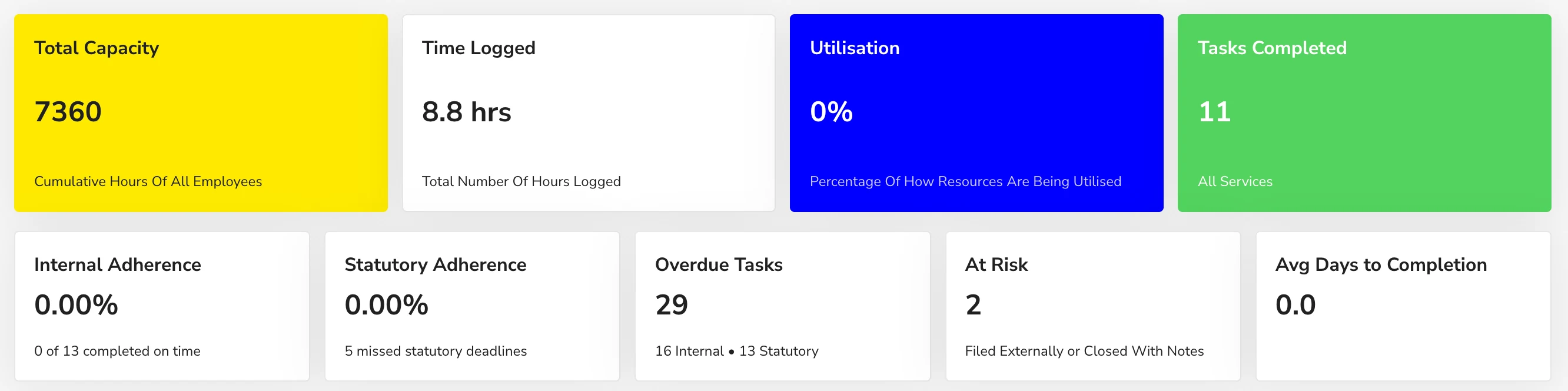
Headline cards cover Total Capacity, Time Logged, Utilisation and Tasks Completed, followed by Internal Adherence, Statutory Adherence, Overdue Tasks split into internal and statutory, At Risk tasks and Average Days to Completion.
Task breakdown for every employee
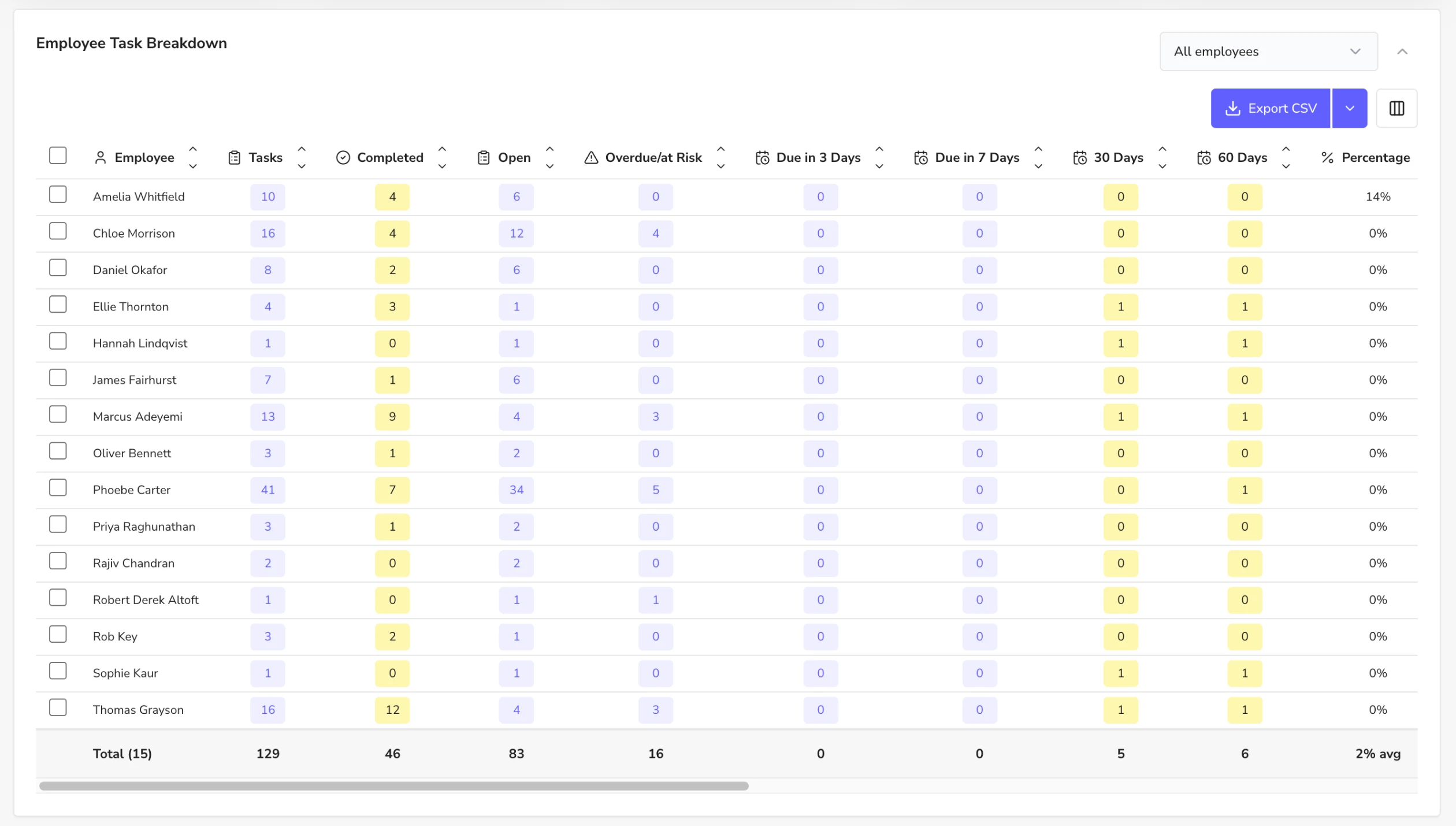
The Employee Task Breakdown shows each person's total, completed and open tasks, overdue or at-risk work, and work due in the next 3, 7, 30 and 60 days. Further columns cover deadlines met, average time against internal and external deadlines, capacity, hours logged, idle hours and utilisation. Filter by employee, choose columns and export to CSV.
Deadline summary for every service line
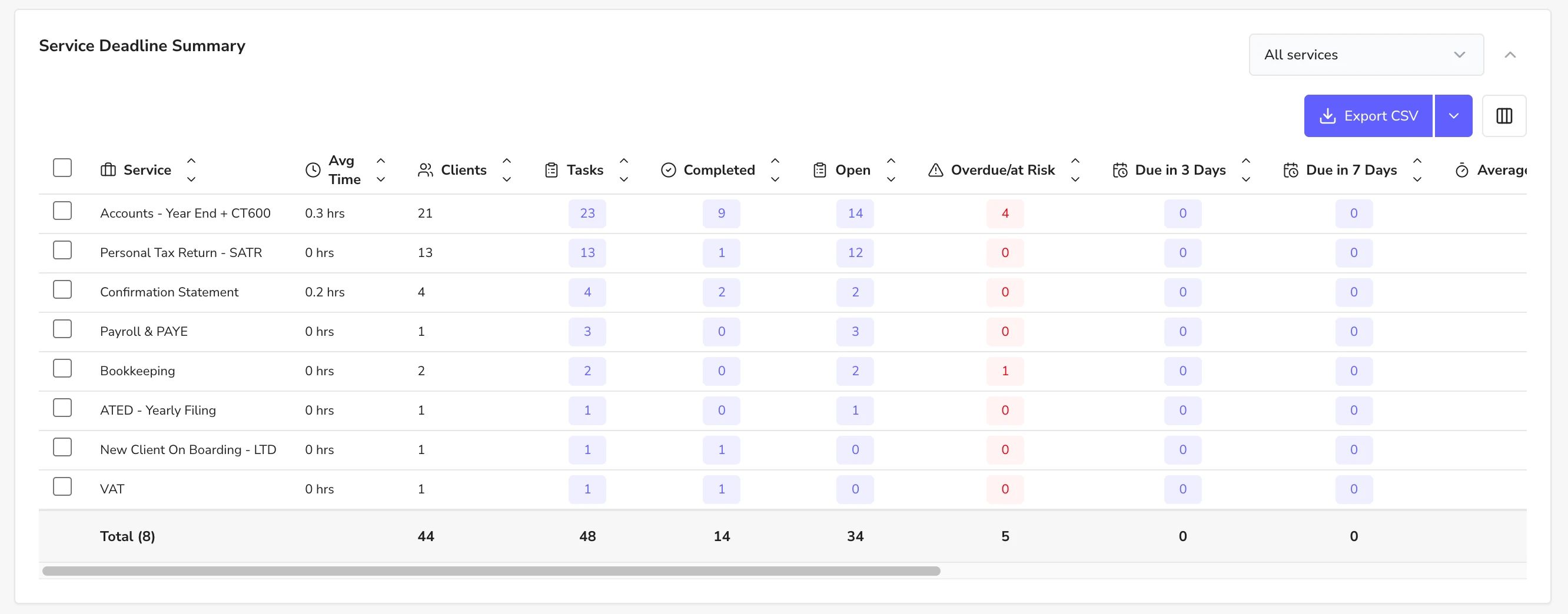
The Service Deadline Summary lists each service — such as Accounts with CT600, Self Assessment, Confirmation Statements, Payroll, Bookkeeping, ATED and VAT — with average time, clients, tasks, completed, open and overdue work, plus what is due in the next 3 and 7 days.
Time spent by service and employee
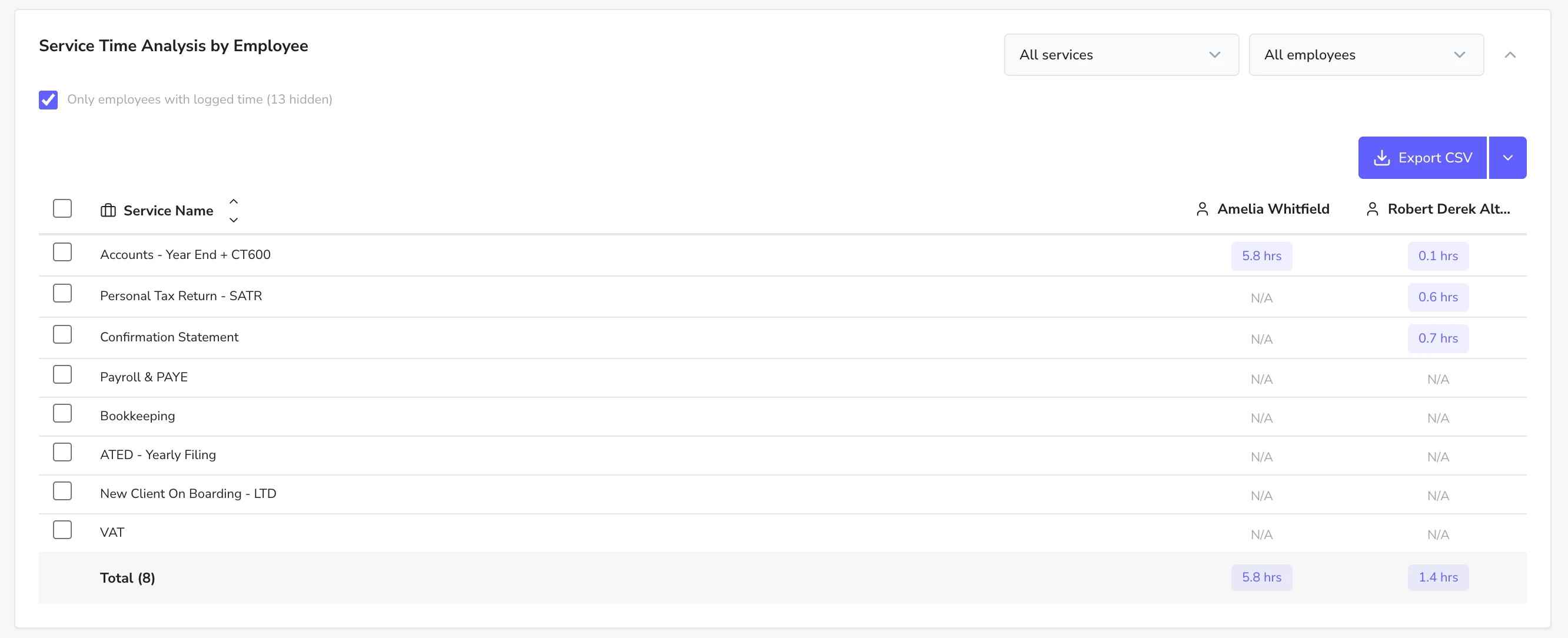
Service Time Analysis shows the hours each employee has logged against each service, with an option to show only employees who have logged time. Use it to understand what each service really costs to deliver and to support your fee reviews.
Explore connected practice reporting
Explore all dashboard reports
Frequently asked questions
What does the Employee & Services dashboard show?
Capacity, time logged, utilisation, tasks completed, internal and statutory deadline adherence, overdue and at-risk tasks, plus breakdowns by employee and by service, and time logged by service.
Can I track statutory deadlines separately from internal deadlines?
Yes. The dashboard reports internal and statutory adherence separately and splits overdue tasks into internal and statutory.
Can I see how long each service takes to deliver?
Yes. The Service Deadline Summary shows average time per service and Service Time Analysis shows hours logged by each employee against each service.
Can I export these reports?
Yes. The employee, service and time analysis tables export to CSV.
See your own practice workflow in Remindoo
Book a Demo to explore reporting for your firm.
Book a personalised demonstration based on your firm’s own process.
Why knowing what each employee is working on matters
In a growing practice, the partner can no longer hold every job in their head. Clear ownership and visible workload are what stop deadlines slipping when someone is on leave, busy or new.
Clear ownership
Every client and task has a named person, so nothing sits unassigned and clients get consistent answers.
Balanced workload
Seeing tasks per person helps managers move work before one person is overloaded and another is waiting.
Cover for absence
When work, notes and history live in one system, a colleague can pick up a job without starting from scratch.
Controlled access
Roles and permissions keep sensitive client and AML data visible only to people who need it.
Practical tips from UK practice
- Group people into teams around services or client portfolios, and name a Team Lead for each.
- Review the employee task breakdown weekly, not only when a deadline is missed.
- Give new starters a limited role first, then widen access as they are trained.
- Use bulk reassignment when someone leaves or goes on holiday, rather than moving tasks one by one.
Related Remindoo features
Written and reviewed by Annie, Product Lead at Remindoo. Guidance is general; check current GOV.UK and professional body guidance for your firm.
What UK practices say about Remindoo
Read all reviews on Trustpilot“With Remindoo, everything from the first enquiry to onboarding and ongoing client management is tracked in one place… It saves us hours and gives me, as a practice owner, complete visibility of where the firm stands.”
“The biggest benefit is having clients, tasks, deadlines, workflows, proposals and communication all organised in one place.”
“During my trial, the team were absolutely amazing. They helped onboard my clients, set up my settings and made sure everything was ready for me to use… they made the whole process completely stress-free.”
“It brings client information, tasks, recurring deadlines, workflows and reminders together in one place, giving us much better visibility across the team.”









